Hi friends this is satyaprakash singh, this is my first blog here i am going to give full and depth review of ten, Budget smartphone so gys lets begin this session.


Top 4 phones under 10k ,with depth review.

1.This is well known brand a XIAOMI   REDMI NOTE 4

                                                                                                                         
The Xiaomi Redmi Note 4 is here, continuing the company's tradition of launching phones with good specifications at low price tags. The strategy has paid off spectacularly, as Xiaomi crossed the $1 billion revenue milestone in India last year. While the company's vast product portfolio now includes fitness bands, earphones, air purifiers, power banks, and other devices, smartphones continue to be the stars, and the Redmi series - of which the Redmi Note 4 is the newest member - has been a key contributor to its success.
The Xiaomi Redmi Note 4 follows in the footsteps of the Redmi Note 3 and Redmi 3S, which were among the top selling devices online last year. The Redmi Note 3, in particular, saw a lot of success in the Indian market with over 2.3 million units sold within six months of launch. However, that model is almost a year old now, and on Thursday Xiaomi finally launched the Redmi Note 4 in the Indian market.
Much like its predecessor, the Xiaomi Redmi Note 4 model sports an-all metal body and boasts of impressive specifications. While the Chinese version of the Xiaomi Redmi Note 4 was unveiled in August last year with a MediaTek SoC, the one launched in India packs a Qualcomm chip. The Redmi Note 4 has been priced competitively and will be going up against some of the most popular smartphones in the market right now. Will the new Xiaomi Redmi Note 4 be able to continue the company's dream run in the Indian market, or will it turn out to be a run-of-the-mill device? Find out in our Xiaomi Redmi Note 4 review.

Xiaomi Redmi Note 4 look and feel

The Redmi Note 4 follows the Redmi Note 3 closely when it comes to design. The front panel of the Redmi Note 4 is very similar to that of its predecessor, with similar capacitive navigation buttons below the display and slim borders around it. There's also 2.5D curved-edge glass across the front, giving this phone a premium feel. The all-metal phone feels sturdy, and compared to the Redmi Note 3, the rear panel on the Redmi Note 4 is less slippery.
The rear of the Redmi Note 4 is a bit different though, featuring design contours more reminiscent of the Xiaomi Mi 5 (Review). There are fine antenna bands running across the top and bottom. The rear camera, dual-tone LED flash and fingerprint scanner are set up much the same as on the Redmi Note 3. One of the few differences between the two is that this time around Xiaomi has shifted the speaker grilles from the rear to the bottom. The bottom also houses a Micro-USB port for charging and data transfers, while the top packs a 3.5mm audio jack and an infrared (IR) emitter. The power and volume buttons are placed on the right, and can easily be accessed with fingers.
xiaomi redmi note 4 rear gadgets360 xiaomi
At 8.3mm, the Xiaomi Redmi Note 4 is slimmer than its predecessor, and just one gram heavier. We had no problem using the handset with just one hand. The rounded edges of the Redmi Note 4 actually fit well in palm without causing any discomfort when used for long periods. When it comes to design, the Redmi Note 4 can be considered the best Redmi smartphone so far. It was launched in China in Dark Grey, and Gold, though Grey seems to have been replaced with an exclusive Matte Black option in India. We received a Gold unit for our Xiaomi Redmi Note 4 review.
The 5.5-inch full-HD IPS display has a resolution of 1080x1920 pixels, which works out to a density of 401ppi. Thanks to the full-HD resolution, text and images appear razor sharp. The Xiaomi Redmi Note 4 display offers punchy colours and decent viewing angles, while sunlight legibility is also great. The screen size makes the Redmi Note 4 well suited to watching videos and movies. You can adjust the colour temperature from the Settings app. A Reading Mode makes the display more comfortable to use while reading.

Xiaomi Redmi Note 4 specifications and features

The Xiaomi Redmi Note 4 launched in India is powered by the octa-core Qualcomm Snapdragon 625 (MSM8953) processor clocked at 2GHz with an integrated Adreno 506 GPU. Xiaomi is selling three variants of this model in India: 2GB of RAM and 32GB of storage; 3GB of RAM and 32GB storage; and 4GB of RAM and 64GB of storage. The company provided us with a sample of the top end variant for our Xiaomi Redmi Note 4 review.
The handset has a hybrid SIM tray which supports one Nano-SIM and one Micro-SIM or a microSD card. Xiaomi notes that both SIM cards support 3G and 4G networks. The company has definitely taken note of complaints of the Redmi Note 3's 32GB microSD capacity limit. The Redmi Note 4 supports microSD cards of up to 128GB which should be sufficient for most people.
xiaomi redmi note 4 charging port gadgets360 xiaomi
Xiaomi Redmi Note 4 has a non-removable 4100mAh battery which is marginally bigger than the 4050mAh one seen on the Redmi Note 3. There's a 13-megapixel rear camera with f/2.0 aperture, PDAF (phase detection autofocus), and a dual-tone LED flash. There is also a 5-megapixel front-facing camera with f/2.0 aperture and a fixed-focus lens. Users also get dual-band Wi-Fi 802.11a/b/g/n, Bluetooth 4.1, USB OTG, FM radio, GPS/ A-GPS, Miracast, GLONASS, and BeiDou. Much like its predecessor, the Redmi Note 4 also gives NFC connectivity a miss. 4G and VoLTE are supported, and we were happy with call quality.
The Redmi Note 4 runs MIUI 8 based on Android 6.0.1 Marshmallow. Xiaomi has added plenty of new features including Now on Tap which was one of the highlights of Android Marshmallow, introduced in 2015. Google's Now on Tap can be triggered within any app just by long-pressing the Home button, and can use what's on screen as context for your searches. MIUI 8 on the Redmi Note 4 looks light and polished compared to previous versions. We were impressed with the system animations, which look refreshing, including a neat one when you uninstall an app.
MIUI 8 comes with a new Gallery app that automatically syncs stored photos on the device with Mi Cloud. Users get 5GB of free cloud storage on signing up for an account. The Gallery app now comes with video editing and sharing features.
The Quick Ball feature, which was first seen on the Xiaomi Mi Max (Review), is available on the Redmi Note 4 as well. This is a hovering button that stays on the screen at all times, including on the lock screen, and lets users define up to five shortcuts for easy access.
With privacy in mind, the Redmi Note 4 offers Dual Apps and Second Space, two of our favourite software features. The Dual Apps feature, as the name suggests, creates two instances of any app on the same smartphone, so you can, for example, use two WhatsApp accounts at the same time. Second Space, on the other hand, lets users separate business and personal data on the same phone. The feature lets users use two entirely separate Google accounts.
Another highlight of the software is scrolling screenshots, which lets users take screenshots of entire Web pages. Xiaomi has also worked on its dialler app which is now light and easy to use. MIUI 8 brings a caller ID feature to the Redmi Note 4, which eliminates the need for third-party apps such as Truecaller. The Messages app has also received some much-needed tweaks in the latest version, such as the ability to bundle similar messages into folders. In our case, texts received from banks, food chains and other services were moved into one folder, which was helpful in prioritising what to check first. The preloaded Themes app offers plenty of options for wallpapers, ringtones, and icons.
Xiaomi has also included a one-handed mode, which basically shrinks the display to one side of the screen and lets users select effective screen sizes - 3.5, 4, and 4.5 inches.
xiaomi redmi note 4 marshmallow gadgets360 xiaomi
The Xiaomi Redmi Note 4 has plenty of preloaded apps including Security, Compass, Scanner, Recorder, Feedback, Mi Picks, Mi Community, Mi Remote, Music, Mi Store, Weather, and a default browser. Unfortunately, there is no way to uninstall the preloaded Xiaomi apps. We feel that Xiaomi should reduce the number of preloaded apps on its future devices or at least offer the option to uninstall some of them.

Xiaomi Redmi Note 4 performance

The Xiaomi Redmi Note 4 was able to handle almost everything we threw at it, and we had no complaints with the octa-core processor. It handled heavy games with ease and we had fun playing Asphalt 8 and Dead Trigger 2 on the device. We were able to use the Redmi Note 4 over the course of a few weeks, and never felt that we needed a more powerful processor. Multitasking on the Redmi Note 4 was quick, and apps launched without delay. Our test unit with 4GB of RAM had enough free memory at any given time. We noticed that 1.8GB of RAM was in use at all times, leaving us sceptical about the experience we would have had using the variant with only 2GB of RAM, which could be more popular due to its lower price.
The Redmi Note 4 is very good for media playback thanks to the excellent IPS display, and it supports high-resolution video files, including 4K ones. The speaker at the bottom is decently loud and we didn't notice any distortion at higher volumes. Xiaomi didn't send us a headset with this unit, so we tested audio quality through our own headphones, and were happy enough.
Xiaomi Redmi Note 4 managed an impressive 65,560 in AnTuTu and 42,690 in Quadrant, which is higher than what we got from the recently launched Lenovo P2 (Review) and Asus ZenFone 3 (Review) both featuring the same Snapdragon 625 processor. GPU performance was also good, and we saw a healthy 28fps in the T-Rex test in GFXbench, and 9,029 points in 3D Mark Ice Storm Extreme. These scores are along the lines of what we expected, but it is worth pointing out that the Redmi Note 3 (Review) with a Snapdragon 650 processor achieved better overall scores.
There are plenty of modes to choose from in the camera app, including Beautify, Panorama, and Manual. In the Scenes mode, the device lets users choose from loads of options including portrait, landscape, sports, night, night portrait, beach, snow, sunset, fireworks, backlight, and flowers.You can also apply filters while taking photos, which is nice. The Xiaomi Redmi Note 4 camera app can record videos at full-HD (1080p) resolution and quality is pretty good. Selfies taken with the Redmi Note 4 had good colours and details, but again, those taken in well-lit situations were better than those taken in low light.
Tap to see full-sized Xiaomi Redmi Note 4 camera samples
The 13-megapixel rear camera of Xiaomi Redmi Note 4 can take some decent landscape shots in well-lit as well as low-light situations. Macro shots also appear good, with proper colour accuracy and details. The PDAF feature lets the camera focus on subjects quickly. Low-light shots have good detail, though on zooming in one can see the graininess. The Redmi Note 4 was also able to take good photos of moving subjects.
Xiaomi has focused its efforts on improving camera quality on the Redmi Note 4 after complaints about camera quality on last year's model, and it's clear that things are better. However, we'd still like to see low-light performance improved.
Xiaomi Redmi Note 4's 4100mAh non-removable battery lasted for 15 hours and 10 minutes in our continuous video playback test, which is impressive for a battery of this capacity. In real-world use, the phone was able to last for up to two days. With heavy usage, we got to nearly a day and a half without needing to use any of the battery saving modes. We were especially impressed with the handset's ability to latch on to weak cellular as well as Wi-Fi network signals. We were not provided with a retail box with all accessories for our review, and so we can't comment on how long it would take to charge with the bundled changer. However, there is no support for quick charging, which would have been a welcome feature at this price level.
Verdict
The Redmi Note 4 is a great package with the only downsides being its hybrid SIM slot, lack of quick charging, and excess of preloaded apps. We think that the Redmi Note 4 will provide tough competition to other smartphones in its price segment, and even some priced a little higher. It scores very well in terms of design, battery life, and performance. For those who are looking for a smartphone with a big screen and great battery performance on a budget, the Redmi Note 4 is easy to recommend.
The Xiaomi Redmi Note 4 has been launched in three variants in India. At a starting price of Rs. 9,999 (2GB RAM + 32GB storage), the Redmi Note 4 is definitely a compelling option for users who are looking for a low-cost device. Our impressions are based on the highest-specced variant, and given the difference in prices between the three, we would suggest people skip the lowest one if they can afford to. The version with 3GB of RAM and 32GB of storage has been priced just Rs. 1,000 higher at Rs. 10,999, while the version with 4GB of RAM and 64GB of storage - the one reviewed here - is also a reasonable step up at Rs. 12,999.
For the latest tech news and reviews, follow Gadgets 360 on TwitterFacebook, and subscribe to our YouTube channel.

  • Design
  • Display
  • Software
  • Performance
  • Battery life
  • Camera
  • Value for money
  • Good
  • Solid build quality
  • Great battery performance
  • Decent cameras
  • Bad
  • Hybrid SIM slot
  • Too much software bloat


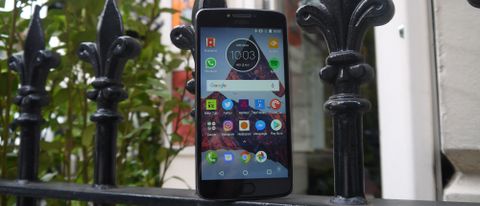
  • 2.One n only moto E4 PLUS

    TODO alt text


    OUR VERDICT

    The Moto E4 Plus comes with much better battery life than both its cheaper sibling, the Moto E4, and the more expensive Moto G5, but if you’re after for a more powerful phone with a Full HD screen you may be better off going for the G5 despite its higher price. However, if battery life is your main concern the Moto E4 Plus is built just for you.

    FOR

    • Huge battery
    • Fingerprint scanner
    • Premium feel for budget phone

    AGAINST

    • Limited power
    • Iffy camera
    • Relatively heavy

    Motorola Moto E4 Plus deals

    ₹9999
    Shipping from 
    Free
    ₹9999
    Shipping from 
    Free
    No price information
    Motorola's E4 Plus is the latest phone from the company, packing a huge battery and trying to up the spec despite a low-end price.
    Battery life is a big concern of almost everyone who wants to buy a new phone, and Motorola has packed this phone with a massive cell that should be able to last at least two days.
    The Lenovo P2 – made by Motorola’s parent company – impressed us earlier this year with its two-day battery life, so we expect some big things from the new E4 Plus, which in some respects replaces that phone.
    Given that its specs are limited in other areas, leaving the phone with less heavy lifting to do, we expect the Moto E4 Plus to do some fantastic things in the battery department, but do the rest of the components add up to make this a worthwhile phone?

    Moto E4 Plus release date and price

    • Out now in the US and UK, no word on Australian release
    • Costs $179.99 or £159, making it a touch more expensive than the Moto E4 
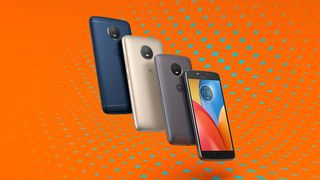
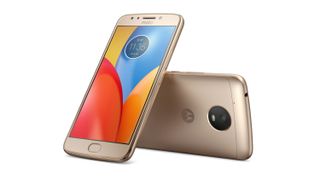
    All the color options for the Moto E4 Plus.
    The Moto E4 Plus is out now in the US and UK, so you can buy this phone for $179.99/£159 (around AU$240).
    In the US the phone is available through Verizon or selected retailers SIM-free. In the UK you can buy it from Argos and a selection of other stores.
    That price is a touch more expensive than the Moto E4, a phone which we liked enough to give four and a half stars and which is priced at $129/£129, but the E4 Plus is not that much more money considering the slightly improved spec.
    There’s no currently no scheduled Australian release date and considering the Moto E4 wasn’t released there we wouldn’t an E4 Plus release either.

    Design

    • Premium feel metal design, unlike the Moto E3
    • Thicker and heavier than your average phone
    • Curved and smooth back means it sits comfortably in the hand 
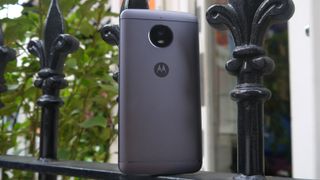
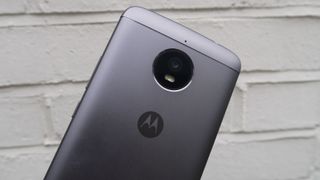
    The rear of the Moto E4 Plus.
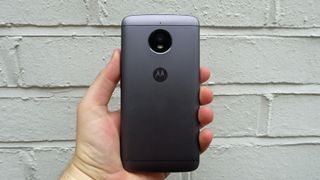
    The Moto E4 Plus is encased in a full metal shell that gives it a premium feel many other affordable phones aren't able to replicate. It has a curved back, helping it sit in your hand comfortably too.
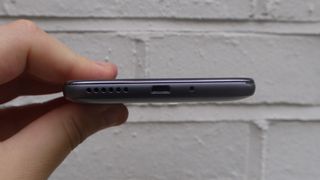
    On the bottom of the phone there's a speaker and a micro USB port. On the top there’s a 3.5mm headphone jack if you want to use wired headsets for listening to music.
    The speaker is on the left with the microUSB port in the middle.
    It may sit comfortably in your hand, but the Moto E4 Plus isn't very light – it weighs 198g – and it’s also quite thick at 9.6mm. That makes it chunkier than the 9.3mm-thick Moto E4, and it’s down to the much bigger battery that's been packed in.
    You’ll likely notice this in your pocket more than the Moto E4 or Moto G5, which come in at 151g and 145g respectively.
    The Moto E4 Plus is heavy, but it sits comfortably in the hand.
    That said, it doesn't make the E4 Plus ugly. Its metal shell leaves it looking good, and overall Motorola has managed to build in a bigger battery without compromising the design too much.
    Advertisement
    There’s no SIM slot on the metal outside of the phone – you pull off the back cover to insert your microSD card and SIM (you can’t remove the battery though). We found it to be particularly difficult to pull off, so swapping your SIM card or microSD may not be as easy as you’d hope for, although it’s unlikely you’d be doing so regularly.
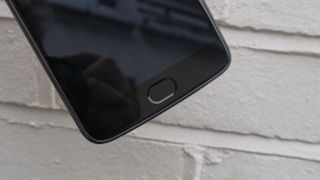
    There's also a fingerprint scanner below the screen, which we found to work well. You may find the sensor a little small  compared to those on some other devices, but it always picked up our fingerprint for a simple unlock.
    The fingerprint scanner on the E4 Plus is small, but works well.
    Having a fingerprint sensor on a phone this cheap is a major plus, and you’ll likely appreciate it as a fast and simple way of unlocking your phone.
    The design of the Moto E4 Plus certainly isn’t perfect, but considering the price point of this phone, and the fact that the earlier Moto E3 line came with a much uglier plastic shell design, this is a big improvement.

    Display

    • Large display with a HD resolution, but only 720p
    • May prove too large for some, but it’s a bright and clear screen 
    The 5.5-inch 720p screen on the E4 Plus is bright and clear.
    The Moto E4 Plus has a 5.5-inch HD (720p) display, which you may see as a low-resolution option. 
    Advertisement
    It does offer 267 pixels per inch though, which means you'll struggle to spot any pixelation in images unless you're looking closely.
    It’s not, however, as high a resolution as previous Lenovo-built devices like the P2, Moto G5 or the Moto G5 Plus. If you’re looking for a higher resolution you may be able to get the Moto G4 or G4 Plus, which features a Full HD display, for a similar price.
    During our usage though we found the Moto E4 Plus to have a bright and clear display that looks good for watching video, despite the lower resolution. If you’re not fussed about the higher resolution screen, this display will still allow you to comfortably use your apps and watch video.
    Plus the lower resolution puts less of a strain on the battery, contributing to the excellent battery life of the Moto E4 Plus.

    Battery life

    • Impressive two-day battery life with average usage
    • Means you won’t have to recharge your phone every night, unless intensively using it 
    The battery is certainly the highlight of the Moto E4 Plus. It's a huge 5,000mAh cell, and throughout our time testing the phone we found the battery life to be nothing short of incredible. If you’re looking for a device that can last two days from a single charge, this is it.
    If you’re using your phone intensively the battery life will more likely be around a day and a half, but our usage was fairly typical, and we found that it would indeed last for a whole two days.
    For comparison, the standard Moto E4 only has a 2,800mAh juice pack, while even the massive Samsung Galaxy S8 Plus has just a 3,500mAh cell.
    The Moto E4 Plus also comes in gold.
    Both those phones can last a whole day, but the Moto E4 Plus’ 5,000mAh battery is only powering a low-end device with a limited processor and 720p screen, so it’s not surprising that it’s able to offer even better battery life.
    There’s fast-charging tech built in here, but you’ll need to use the dedicated charger included in the box to make the most of it, so you won’t be able to fast-charge at a friend’s house or if your charger breaks.
    When charging normally, the E4 Plus takes a particularly long time to top up on account of that 5,000mAh cell, so you’ll want to try and keep your fast charger on you if you’re out and about.
    There are no bells and whistles here, such as wireless charging, you’re just getting solid battery life the old-fashioned way – and if that’s what you want from your device then you’ll have no complaints.

    Camera

    • 13MP sensor looks better on paper than how it actually performs
    • It can take decent images, but lacks interesting camera features 
    The rear camera on the E4 Plus is large with a 13MP sensor.
    The Moto E4 Plus has a 13MP sensor on the rear, which may look great on paper, but the shooter is particularly limited.
    For example, you'll be restricted to only 720p video recording, while there’s a noticeable lag between you pressing the capture button and the photo actually being taken.
    We found the resolution of images to be acceptable and despite a high aperture of f/2.0 the images still seemed bright and captured with a lot of light in. Night time shooting saw the Moto E4 Plus struggle a little, but that’s expected on a phone at this price.
    Images captured in good lighting looked nice and bright, and resolution was acceptable. Low light shooting saw the Moto E4 Plus struggle a little, but that’s to be expected with a phone at this price. 
    There’s no real standout camera feature on the Moto E4 Plus. If you’re looking for a device that can take the odd image for uploading to Instagram or sharing with friends, you’ll likely be happy with the camera on the back here.
    There's a 5MP selfie camera on the front of the phone that comes with an LED flash. Again it’s fine for the odd photo, but don't buy this phone specifically for its selfie camera, as features are limited here too. 


    Image 1 of 5

    Anything else I need to know?

    Motorola has included a Mediatek MT6737 chipset in the E4 Plus, which is a setup we saw struggle on the Nokia 3. It's clocked at 1.3GHz and it’s optimized a bit better on the Moto E4 Plus, but don’t expect this to be a powerhouse device.
    It works in tandem with 3GB of RAM, which means the phone is capable of handling all the apps you’ll want it to, and it should be fine for some undemanding gaming.
    There was a notable graphics drop on the Moto E4 Plus compared to other devices we’ve used, though, so you may not want to go for this phone if you’re looking for high-performance game graphics.
    War Wings being played on the Moto E4 Plus.
    All popular apps ran smoothly on the phone. You may just have to wait a little longer for your phone to load up certain apps if you have a lot running in the background.
    For example, we found that if we tried to load up social media apps while the phone was playing music and running a few other applications in the background it could take a little time to load, but it was never more than a few seconds.
    The Moto E4 Plus is available with either 16GB or 32GB of onboard storage. We’d recommend going for the 32GB version, as that will give you much more space for your videos, music and apps, but if you don’t tend to load much onto your phone you may be okay with the smaller version.
    We tested the 16GB version of the phone, and before adding our own apps and media we found the software took up almost 6GB of that; 10GB of free space isn’t all that much. That said, both versions of the phone support microSD cards up to 128GB, so you can easily add more storage if you need it.
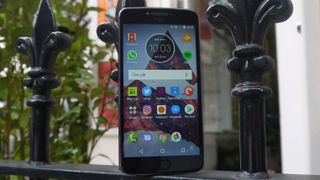
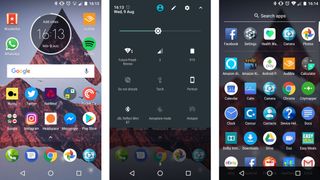
    The Moto E4 Plus arrives running Android 7.1.1 Nougat software, and like all the other Motorola devices of recent years it's running a more or less stock version, so it looks very similar to how Google intended.
    These screenshots show the UI of the Moto E4 Plus.
    There are a few add-ons from Motorola, including what the company is calling Moto Actions. These are a few little gesture shortcuts that, once you learn them, you’ll likely find yourself using without even thinking about it.
    If you make a karate chop gesture with the phone you’ll boot up the flashlight on the back, while you can turn the phone in your hand to bring the camera app up immediately. When you’re in a rush, you’ll find these features particularly useful.
    Having Android 7.1.1 means you’ll be able to use multitasking and newer emojis, but we’d also expect Motorola to update this device to Android O in the future. We can’t promise the company will be quick at doing so though, so you may want to opt for the Moto G5 or Moto Z2 Play if you’re looking for speedy software updates.

    Verdict

    Motorola has continued its dominance in the affordable smartphone space with the E4 and E4 Plus. The E4 Plus in particularly is one of the best devices you can get for your money at this price point, which is remarkably low considering what you get. 
    The extended battery life is a big bonus, but everything else on the E4 Plus adds up to a full package.
    There are a few high-end features missing, such as a kick-ass camera and great performance, but if you’re looking for a cheaper device that can achieve everything most modern smartphones do this could well be it.

    Who’s it for?

    If battery is your biggest concern when purchasing a phone, the Moto E4 Plus is a great option for you to upgrade to. We found it could comfortably last two days on a single charge, and that’s something a lot of phones right now aren’t capable of doing.
    You will be limited by the 720p screen and low-end processor, but you may feel it’s a trade-off worth making in return for the extended battery life.
    This is also a device for anyone who’s looking for an affordable phone. At only $179.99/£159 (around AU$240) you get a lot for your money.

    Should you buy it?

    If you’re either looking for an affordable phone, or a device that will last you a couple of days on a single charge, go for the Moto E4 Plus.
    There isn’t an incredible camera or a powerful setup under the hood, but it does everything you’ll need it to, and comes packed with that phenomenal battery, the likes of which we’ve only seen on a few devices in the past.
    For comfortably under $200/£200, the Moto E4 Plus is a steal of a device, and it will likely be one of our most recommended affordable phones for the foreseeable future.


    3. Lenovo K6 Power

    One of the best phones from the last year at this price point, the Lenovo K6 Power is still a good choice if you're looking for a mobile phone under Rs. 10,000, with performance that's still good enough, and excellent battery life.
    Lenovo today holds the second place in terms of smartphone market share in India, according to IDC data for Q3 2016. The Chinese company has been one of the few companies that has been launching 4G-enabled smartphones in India for a long time.
    In 2015, the company claimed it had a 30 percent share of the 4G smartphone market in the country. Lenovo's dominance however has been challenged by other vendors, even as the market grows thanks to Reliance Jio's 4G network and other telcos making big investments in 4G as well. Lenovo has been dealing with solid competition from other Chinese counterparts including Xiaomi, which has for the first time made it into the top five in India.
    The recently unveiled Lenovo K6 Power tries to further strengthen the company's portfolio in the sub-Rs. 10,000 price segment. The company already offered a slew of models in this segment including the Lenovo Vibe K5 (Review), Lenovo Vibe K5 Plus (Review), and the now-dated Lenovo Vibe K4 Note(Review). The new Lenovo K6 Power features an all-metal body and comes with a fingerprint scanner. One of its highlights is a large 4000mAh battery which also supports reverse charging, which means it can charge other devices connected to it.
    There are other models in the same price bracket that offer similar features, such as the Xiaomi Redmi 3S Prime (Review), Coolpad Note 5, and Asus ZenFone Max (2016) (Review). In our first impressions, the Lenovo K6 Power looked like a solid competitor in its price segment, but will it be able to live up to our expectations? Let's find out.

    Lenovo K6 Power design and build
    At first glance, the metal-bodied Lenovo K6 Power looks strikingly similar to the Xiaomi Redmi 3S Prime. The two are more similar when seen from the front than from the back, as the rear has some differences in terms of the camera placement and antenna bands. The camera is placed in the middle alongside an LED flash and the fingerprint scanner, similar to the arrangement on the Xiaomi Redmi Note 3.
    Lenovo branding can be seen on the lower back, along with dual speaker grilles. The phone is available in Dark Grey (which we got for review), Gold, and Silver. The front of the K6 Power is dominated by a 5-inch screen, with capacitive navigation buttons below. We wish that the navigation buttons had been backlit, as we struggled to find them in the dark.
    At 9.3mm and 145 grams, the Lenovo K6 Power is definitely thicker but barely heavier than the Redmi 3S Prime, which measures 8.5mm thick and weighs 144 grams. The physical button placement on the K6 Power is ergonomic. The power and volume buttons are on the right, while the left has the SIM slot. The 3.5mm headphones socket and Micro-USB charging port are on the top. A notification LED is hidden in the earpiece grille.
    lenovo k6 power redmi 3s prime gadgets360 lenovo
    The fingerprint scanner is sensitive and unlocks the phone quickly. Lenovo has included app lock functionality which can be set up to use the fingerprint sensor.
    The all-metal body gives the K6 Power a premium feel, though it also makes the phone a bit slippery. It could slip out of a hands if not held carefully. However, it was easy to use with just one hand thanks to the manageable 5-inch screen. We liked some of the UI additions made by Lenovo including the shortcut of double-pressing on a volume button to launch the camera app quickly. This works even with the phone locked.
    The 5-inch screen on the Lenovo K6 Power has a full-HD resolution, for a density of 441ppi which makes text appear quite sharp. Brightness is good and colours are punchy. Viewing angles and sunlight legibility are also decent. The display on the K6 Power is one of its biggest highlights. The Lenovo K6 Power's retail box includes a regular charger, a data cable, a SIM ejector tool, and instruction leaflets.
    Lenovo K6 Power specifications and features
    The Lenovo K6 Power is powered by the same Qualcomm Snapdragon 430 processor that we've seen in the Xiaomi Redmi 3S Prime. This octa-core SoC is clocked at 1.4GHz and is coupled with 3GB of RAM. The phone has 32GB of inbuilt storage and supports expansion using a microSD card (up to 128GB). Dual Nano-SIMs are supported, but unfortunately, the K6 Power uses a hybrid SIM slot which means users have to chose either two SIMs or one SIM with a microSD card. Connectivity options include 4G with VoLTE, Wi-Fi 802.11 b/g/n, Bluetooth 4.2, FM radio, Micro-USB, and GPS/A-GPS.
    The Lenovo K6 Power runs on Android 6.0 Marshmallow with Lenovo's Vibe Pure UI on top. The company has been reducing the bloatware on its smartphones, and the UI on the K6 Power definitely felt smooth. There are two default home screens with app icons scattered across them. It's worth mentioning that there is no default Gallery app on the K6 Power, which might be slightly confusing for new users. Google Photos is preinstalled but not set as the default photo handler. Lenovo however provides access to all kinds of files through a File Manager app.
    The dropdown shade offers quick settings along with notifications. The preloaded Themes Center app offers several customisation options for wallpapers, icons, lock screen settings, and more.
    Two of our favourite software features on the Lenovo K6 Power are the app lock functionality, which allows users to lock any app with a fingerprint, and the Dual Apps mode that allows apps to be used with two different accounts on the same phone. We tested the feature and it worked as described. The second instance of the app is marked with blue SIM tag.
    The K6 Power's Settings app has a section called "Feature" which includes various quirky customisations from the company. Quick Snap lets users take an image by double pressing a volume button; Knock to Light wakes the phone with double-tap on the screen while it is off; Wide Touch offers one-touch shortcut access through a floating button; Fingerprint Snap lets the fingerprint sensor act as an alternative shutter button; and Quick Flashlight lets you toggle the flashlight by long-pressing the Home button. Lenovo has also incorporated a VR Mode with its switch hidden inside the "Feature" settings page.
    We found several third-party apps preloaded on the K6 Power including Evernote, Flipkart, McAfee Security, Skype, Shareit, Truecaller, Syncit, and UC Browser.
    Lenovo K6 Power performance
    The Lenovo K6 Power was able to handle most everyday jobs and we had no complaints with the octa-core processor. Even visually demanding games like Need for Speed: No Limits worked smoothly. Multitasking on the K6 Power was fine, and apps launched quickly. While using the device, we noticed that there was over 1GB of memory free at any time, and we experienced no lags in terms of system performance during the review period. There was no problem with overheating either.
    lenovo k6 power sides gadgets lenovo
    The display on the Lenovo K6 Power is great for media consumption. It was a treat watching videos, and playing games on this device. The dual speakers at the back are loud enough to fill a small room with decent audio quality. The phone also supports Dolby Atmos to tweak audio settings. The quality of the bundled earphones however was awful.
    The Lenovo K6 Power, despite being powered by the same Snapdragon 430 processor as the Redmi 3S Prime, returned much lower scores than its competitor in several benchmarks. It managed 27,372 on AnTuTu, 19,718 overall in Quadrant, 5,603 in 3DMark Ice Storm Extreme, and 15fps in GFXBench's T-Rex test. In contrast, the Xiaomi Redmi 3S Prime managed 40,250 in AnTuTu, 21,253 overall in Quadrant, 5,714 in 3DMark Ice Storm Extreme, and 24fps in GFXBench's T-Rex test.
    The Lenovo K6 Power sports a 13-megapixel rear camera with a Sony IMX258 sensor, PDAF (phase detection autofocus), and an LED flash, plus an 8-megapixel front camera with a Sony IMX219 sensor and a wide-angle lens. The K6 Power's rear camera can lock focus quickly thanks to the PDAF. The camera took some decent close-up shots that exhibited good colour accuracy, though on zooming in we found noise towards the corners.
    Tap to see full-sized Lenovo K6 Power camera samples
    The biggest problem with the camera on the Lenovo K6 Power is that it requires a good amount of light around. Low-light shots tended to have a lot of noise, and unfortunately, even the otherwise helpful Smart Composition tool couldn't fix that. The K6 Power's rear camera was unable to capture objects in motion well, something we also experienced with the Lenovo Vibe K5. The K6 Power can record videos at full-HD resolution. and these came out looking good. The front camera took decent selfies in well-lit situations though a screen flash would have helped in the dark.
    There is support for 4G with VoLTE, and call quality was impressive. The K6 Power was able to latch onto mobile networks in areas with poor connectivity quite well.
    The non-removable 4000mAh battery on the K6 Power managed to last for 14 hours and 30 minutes in our video loop test, which is not bad for a battery of this size. The Redmi 3S Prime with a slightly larger 4100mAh battery managed 14 hours and 50 minutes under the same conditions, but it's worth noting that the K6 Power sports a full-HD screen while the Redmi 3S Prime has a lower-resolution i.e. less power-hungry HD screen.
    With heavy usage, the Lenovo K6 Power easily managed to last over a day, which was impressive. There's also an Ultimate Powersaver mode which extends battery life by disabling all functions other than calls and SMS messaging. We also tried the reverse charge functionality using our own Micro-USB adapter, which doesn't come bundled in the box. The ability of the K6 Power to be used as a power bank could can come handy in emergency situations. We however wish that the device supported fast charging as it took nearly three hours to fully charge the handset.
    Verdict
    At Rs. 9,999, the Lenovo K6 Power is a smartphone with a lot of promising features, and we commend Lenovo for paying attention to the little details. The metal body feels premium, and the fingerprint scanner is a nice bonus. The light Vibe UI was smooth throughout the review process, while the Snapdragon 430 processor turned out to be enough for our everyday tasks. We however felt that the camera on the Lenovo K6 Power is not up to the competition's level and might be this device's Achilles heel. The battery life and display are no doubt the biggest notable features of the K6 Power.
    Considering that the sub-Rs. 10,000 price segment has some of the most popular handsets, it will be interesting to see how the Lenovo K6 Power fares against its competition. Those looking for alternatives can consider the Xiaomi Redmi 3S Prime, if they like MIUI more than Vibe UI and need a better camera.
    For the latest tech news and reviews, follow Gadgets 360 on TwitterFacebook, and subscribe to our YouTube channel.
    • Design
    • Display
    • Software
    • Performance
    • Battery life
    • Camera
    • Value for money
    • Good
    • Good looks and build quality
    • Decent display
    • Excellent battery life
    • Bad
    • No fast charging support
    • Cameras could have been better
    • No dedicated microSD card slot
    4.YU YUREKA BLACK
    THIS is also a good phone comes good spec,can satisfy easily
    Yu Yureka Black Review

    HIGHLIGHTS

    • The Yu Yureka Black is priced at Rs. 8,999
    • The smartphone is on sale exclusively via Flipkart
    • Gadgets 360 rates the phone 8 out of 10
    Yu Televentures, a subsidiary of Micromax, made its debut in the Indian smartphone market at the beginning of 2015 and can be credited with kicking off a price war in the sub-Rs. 10,000 segment. The first few phones from the online-exclusive brand were the original Yu YurekaYu Yuphoria, and Yu Yureka Plus, which showed just how much a buyer could get for relatively little money. The brand claims to have sold over 3 million phones so far in India.
    International Data Corporation (IDC) data shows that until March last year Micromax was the second-highest selling smartphone vendor in India, with a strong offline as well as online presence. However, there were no major Micromax or Yu launches for a long time, and Chinese brands seem to have since taken over.
    Now, the Yu Yureka is back in an all-new avatar, called the Yu Yureka Black. It's the mobile brand's first launch in almost nine months. The new Yu Yureka Black, as before, is an online-exclusive product and promises a whole lot of features. The Yureka Black has a lot to live up to especially because the original Yureka (Review) and Yureka Plus (Review) set high standards and impressed reviewers.
    However, with more competition than ever before, is it too little too late for the company? We go into the details in our review.

    Yu Yureka Black design

    The new Yureka Black might be marketed as a "reincarnation" of the original Yureka smartphone but there's no similarity between the two when it comes to design. The Yureka, launched in 2015, featured a sandpaper finish at the back which became its signature. The new Yureka Black, on the other hand, sports an all-metal unibody with a glossy finish, which definitely feels premium at this price level.
    The Yureka Black has been launched in two versions: Chrome Black, which we received for our review, and Matte Black. The front is covered by 2.5D glass, which gives it visual appeal. There's a physical Home button with an integrated finterprint sensor at the front, which has a chrome accent around it.
    yu yureka black back gadgets360 yu
    The Chrome Black version of the Yu Yureka Black has a mirror-like finish on the rear and sides, and it was hard for us to photograph it without reflections. It was also slippery, and we had to be extra cautious while picking up this phone, as it tended to slip out of our hands. Fortunately, Yu ships a transparent case with the handset, which we recommend using at all times. The rear panel of the Yu Yureka Black has two chrome lines running across the top and bottom mimicking the antenna lines seen on several phones. The primary camera protrudes slightly, though the lens is protected by a metal ring.
    We really like the fact that the Yureka Black lives up to its name, as the colour is its main theme. There's almost no branding on the handset except for a Yu logo on the rear. The bottom of the phone features a standard Micro-USB port and dual grilles, though only one is actually a speaker. The 3.5mm audio jack is at the top, while the hybrid dual-SIM (Micro + Nano) tray is at the left.
    At 8.7mm thick, the Yu Yureka Black is marginally thicker than the Xiaomi Redmi 4, which measures 8.65mm. The 5-inch display is easy enough to use with just one hand, and we ended up using it that way through most of our review. At 150g, the phone felt light enough.
    Overall, the Yu Yureka Black doesn't offer anything new in terms of design, but it doesn't disappoint us either with its looks and aesthetics. The construction quality is a fair bit better than most competitors in this price segment.

    Yu Yureka Black specifications and software

    The Yureka Black features a 5-inch full-HD (1080x1920 pixels) IPS display with 2.5D curved-edge Corning Gorilla Glass 3, which is a nice bonus at this price. The 4G-enabled smartphone is powered by an octa-core Qualcomm Snapdragon 430 processor clocked at 1.4GHz, coupled with 4GB of RAM. This SoC has become a popular choice for low-cost phones across brands, and we have seen multiple recent examples of this, including the Xiaomi Redmi 3S Prime (and Redmi 3S), Lenovo K6 PowerPanasonic Eluga Ray Max, and Motorola Moto G5.
    The Yu Yureka Black has 32GB of storage and supports expansion via a microSD card (up to 64GB). The phone comes has a hybrid dual-SIM design, which means that you have to choose between using a second SIM or a microSD card.
    yu yureka black android gadgets360 yu
    The Yu Yureka Black sports a 13-megapixel rear camera with a Sony IMX258 sensor, PDAF, and a dual-LED flash. There's also an 8-megapixel front camera with its own LED flash. Connectivity options include Wi-Fi 802.11b/g/n, Bluetooth, GPS, and 4G with VoLTE. The phone is powered by a 3000mAh battery, which the company claims can deliver up to 168 hours of standby time and up to 21 hours of 3G talk time.
    Micromax's Yu brand has ditched Cyanogen OS and this phone ships with Android 6.0 Marshmallow, plus some visual tweaks for the app icons, animations, and more. We were surprised to see that Micromax gave its Steroids interface, which was present on previous Yu phones, a miss for the Yureka Black. There are on-screen buttons despite the phone having a physical Home button with unused space on the sides.
    There's no app drawer, and all icons are spread out across three home screens. The icons are all squared off, which we don't really like, and there's no way to change this. You can of course download a third-party launcher from the Google Play store. The original Yu Yureka had far more options for customisation. Yu has tried to limit bloatware on the Yureka Black, and there are literally no apps other than the ones from Google. We really like this approach, as it keeps the phone's storage space free for the user to utilise.
    yu yureka black branding gadgets360 yu
    The Yureka Black also offers Smart Action shortcuts, which we've seen on some other Android phones. You can use three fingers to take a screenshot, lock the screen with a double-tap, and flip the phone over to mute it or snooze an alarm. You can also enable Smart Gestures, which let you do things like launch the camera by tracing an "O" on the screen. This feature worked flawlessly when we tried it. We also really liked the implementation of one-handed mode, which shrinks the display area to one corner of the screen, with a swipe gesture in either direction on the navigation bar.
    During our review period, Yu provided us with a beta version of an Android 7.1.2 Nougat update which the company promises will be released to Yureka Black buyers in a few weeks. Considering that this was a beta build, we faced some snags. It is available to users who want to try it out - it will have to be installed manually rather than as an over-the-air update - though we recommend you wait for the update to be officially rolled out to all users.

    Yu Yureka Black performance

    The Yu Yureka Black was a pleasure to use, and we didn't face any hiccups when it comes to app or UI performance. The Snapdragon 430 processor has been a popular SoC choice for phones in this segment, and it doesn't disappoint on the Yureka Black. Games like Asphalt 8, Need for Speed: No Limits, and Marvel: Contest of Champions ran smoothly, and we didn't encounter any frame drops. Long gaming sessions made the phone warm but not too uncomfortable.
    yu yureka black sides gadgets360 yu
    4GB RAM on the Yu Yureka Black was enough for most tasks, and we never felt the need for more. The phone also did well in our benchmark tests, scoring 44,164 in AnTuTu, which is better than the Xiaomi Redmi 4's score of 43,677 even though that phone features a Snapdragon 435 SoC. The Yureka Black also scored 22,572 in Quadrant, 5,598 in 3D Mark Ice Storm Extreme, and 17fps in GFXbench - all of which were better than average.
    The 5-inch display on the Yu Yureka Black has a resolution of 1080x1920 pixels resulting in a density of approximately 441ppi. The screen is bright, and both text and images appear crisp. Sunlight legibility and viewing angles were pretty decent too. However, we felt that the display is weak in terms of colour saturation and contrast. It definitely isn't the best display we have seen in this category.
    The 13-megapixel rear camera on the Yu Yureka Black managed to take some good shots with well saturated colours. In good lighting, colours popped nicely. Focusing and exposure detection were quick, thanks to phase detection autofocus. We noticed that in shots with too much light, details and textures were slightly muddled and noisy when seen at full size.
    Overall, the detail level in sample shots was good enough, and daytime sample shots were better than what we have seen from other phones such as the Xiaomi Redmi 3S Prime. However, low-light shots came out dull and dark, and there was no way to improve that. We noticed missing details and focusing issues in low light as well. Selfies were passable but we found that shots were often blurry. The phone is capable of recording 1080p videos at 30fps, and the video quality of the Yureka Black is good enough.
    Tap to see full-sized Yu Yureka Black camera samples
    We found that the speaker was loud enough to fill a small room, but don't expect great sound. The phone ships with a pair of earphones, and the quality was decent. We had no complaints about call quality on the Yu Yureka Black. The device supports 4G with VoLTE (voice over LTE) which means that we were able to make calls using a Jio SIM. Both SIMs support 4G, though only one at a time, while the other has to make do with 2G.
    The Yu Yureka Black's non-removable 3000mAh battery lasted for roughly a day of heavy usage. We noticed that the battery dipped to almost 60 percent from a full charge with less than an hour of heavy gaming. In our video loop test, the Yureka Black lasted for 10 hours and 55 minutes, which is decent for a battery of this size. Yu does not claim that this phone supports fast charging, but we found that it can charge fully in roughly 90 minutes, which isn't bad.
    Verdict
    The Yureka Black marks a comeback for the online-exclusive Yu brand, and it has the right specifications, features, and price to appeal to a wide audience. While it may not manage to garner as much interest as the original Yureka did back in 2015, it certainly is a good option in its price category. Its design, performance, and battery life are some of its highlights, but camera performance in low light is an issue.
    At a price of Rs. 8,999, the Yureka Black is a solid all-round performer. The Xiaomi Redmi 3S Prime (Review), Lenovo K6 Power (Review), Panasonic Eluga Ray Max, Motorola Moto G5 (Review), and Xiaomi Redmi 4 (Review) are its most obvious competitors.
    For the latest tech news and reviews, follow Gadgets 360 on TwitterFacebook, and subscribe to our YouTube channel.
    • Design
    • Display
    • Software
    • Performance
    • Battery life
    • Camera
    • Value for money
    • Good
    • Looks good
    • Solid battery life
    • Decent overall performance


Comments